
macOS iPhone · iPad · Mac 商店图 + Listing

AppSnapAppSnap

上架前的最后一步,快一点,再快一点。

把真机截图和产品说明,变成 App Store 能直接用的商店图与 listing。截图怎么排、叠什么字、Connect 各字段怎么写——都在同一份项目里改完导出。
AppSnap 商店图排版预览

你在解决什么问题?

准备上架或改版时,工具一多,版本一乱

Figma 排商店图、文档写描述、表格管关键词,还要对照 Connect 字数上限反复删改?
独立开发者
工具链太散
叠字标题和 listing 各写各的,越改越焦虑,Keynote / 设计源文件越堆越多?
小团队
版本难以同步
已经有真机截图和一段说得清产品的介绍,只想尽快做出可提交的商店素材?
产品运营
上架前赶时间

AppSnap 把这条链路收进一份项目素材。

截图怎么排、叠什么字、Connect 各字段怎么写——都在同一处改完导出。

AppSnap · 真实体验

从排版预览到文案导出,覆盖上架前最后一步

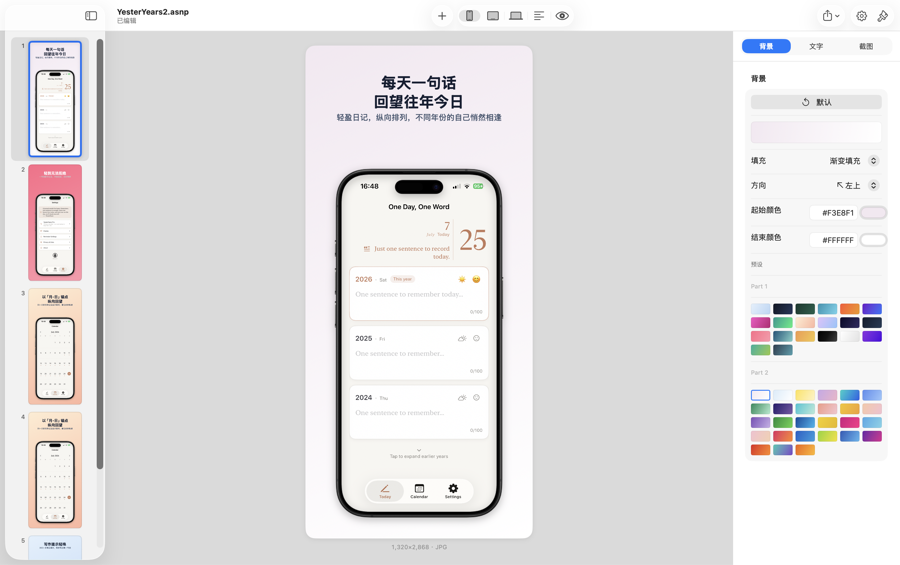
AppSnap iPhone 商店图排版

三端商店图排版

为 iPhone、iPad、Mac 各维护一套独立截图,叠加官方规格机型框,画布实时预览。
AppSnap 背景与模板

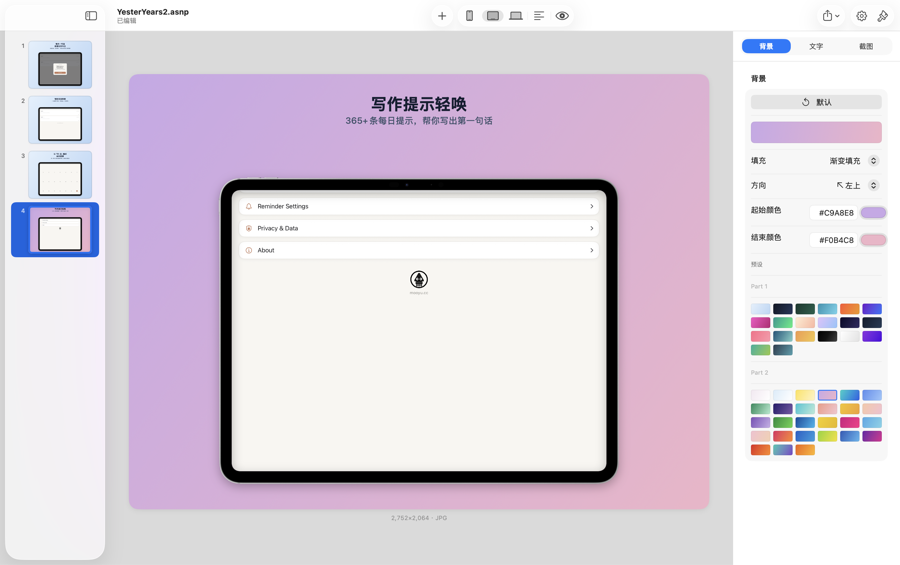
灵活调整叠字与背景

标题与副标题支持换行,字体、字号、位置单独调;背景支持纯色、渐变或自定义图。
AppSnap 商店文案

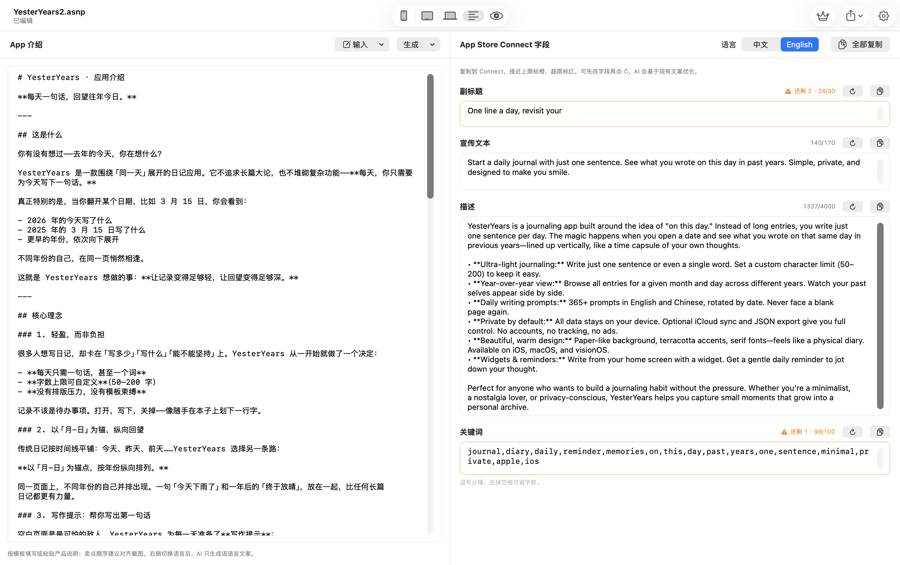
生成与润色上架文案

按中/英生成副标题、宣传文本、描述、关键词与约 5 屏截图叠字,字数校验一键复制。
AppSnap 导出规格

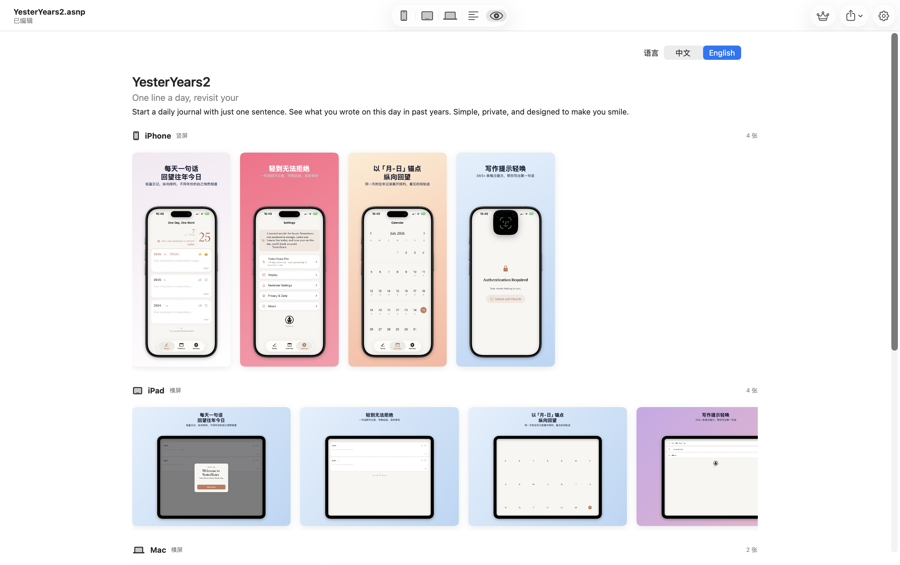
按 Connect 规格导出

默认扁平 JPG,支持导出当前这张、本页全部,或 iPhone + iPad + Mac + 文案一并导出。

AppSnap · 核心亮点

排版 · 文案 · 导出,一条链路做完

三端商店图排版

  • iPhone 竖屏 · iPad 可切横/竖 · Mac 16:10 横屏
  • 截图可排序、可拖入,设备图可缩放、偏移、旋转
  • 多套模板起步;叠字可按语种生成,也可把 iPhone 叠字按页序复用到 iPad / Mac

生成与润色上架文案

  • 基于 App 介绍生成副标题、宣传文本、描述、关键词与截图叠字
  • 规则模板永久可用;AI 生成 / 润色消耗 K 币
  • 网络或余额不足时自动回退规则模板,不挡导出
提示:使用 AI 时相关文案内容会发送至 AI 服务处理;项目截图与 .asnp 文件默认保存在本地。

按 Connect 规格导出

  • iPhone 1320×2868 · iPad 横 2752×2064 / 竖 2064×2752 · Mac 2560×1600
  • 默认扁平 JPG(无透明通道)
  • 字段带字数校验与一键复制,超限会标示

按你的界面语言工作

  • 界面可跟随系统或手动切换中 / 英
  • 中文界面下 listing 可同时看中英 Tab
  • 英文界面专注英文文案
  • 一期不对接 Connect API,导出后仍需在 Connect 里粘贴与上传

典型用法

四步完成可提交的商店素材

1

新建或打开项目

打开 .asnp 项目,写入 App 介绍,为 iPhone / iPad / Mac 分别放入截图

2

排版与叠字

选模板、调机型框与叠字(iPad 可切横竖),预览满意为止

3

生成商店文案

按语种生成或改写 Connect 字段,核对字数

4

导出并提交

导出 JPG 与文案,粘贴进 App Store Connect

免费能跑通上架,进阶按需解锁

AI 仅用 K 币计次,不捆绑订阅

免费档

够用上架

  • 机型框排版、模板、手动叠字与规则文案免费
  • 每设备 Tab 最多 5 张截图
  • 每日 3 次批量导出(单张不限)

适合谁?

已经有截图和介绍,需要尽快做出可提交素材的人

独立开发者 在 Mac 上尽快做出可提交的商店图与 listing,少维护多套设计源文件
小团队 截图排版与文案在同一项目里协作迭代,版本不再散落
产品运营 经常微调叠字与 listing,却不想再开一轮 Keynote / Figma
多端上架者 同时准备 iPhone、iPad、Mac 商店素材,按页序复用叠字

让上架前的最后一步,快一点

AppSnap 面向 macOS,把商店图排版与 Connect 文案收进一份 .asnp 项目。免费档即可跑通上架;需要更多截图与批量导出时再升级永久会员。

AppSnap —— 让上架前的最后一步,快一点,再快一点。

macOS iPhone · iPad · Mac Screenshots + Listing

AppSnapAppSnap

The last mile before shipping — faster, then faster.

Turn device screenshots and your product brief into App Store–ready store images and listing copy. Layout, overlay text, and Connect fields — all in one project, export when done.

AppSnap screenshot layout preview

What problem does this solve?

Before release or a redesign, too many tools mean too many versions

Figma for store images, docs for copy, spreadsheets for keywords — then trimming against Connect character limits again and again?
Indie Developers
Scattered toolchain
Overlay titles and listing copy drift apart — more Keynote / design files, more anxiety with every tweak?
Small Teams
Hard to keep in sync
You already have screenshots and a clear product brief — you just need submit-ready store assets, fast?
Product Ops
Racing the last mile

AppSnap puts the whole pipeline in one project.

Layout, overlay text, and Connect fields — edit once, export when ready.

AppSnap · In Action

From layout preview to listing export — the last mile covered

AppSnap iPhone store image layout

Three-device store layouts

Separate screenshot sets for iPhone, iPad, and Mac with official device frames and live canvas preview.

AppSnap backgrounds and templates

Flexible overlays & backgrounds

Titles and subtitles support line breaks; font, size, and position are independent. Solid, gradient, or custom backgrounds.

AppSnap store listing copy

Generate & polish listing copy

Create subtitle, promotional text, description, keywords, and ~5 overlay screens in Chinese or English — with length checks and one-click copy.

AppSnap export sizes

Export to Connect specs

Flat JPG by default. Export the current image, the whole page, or iPhone + iPad + Mac + copy together.

AppSnap · Highlights

Layout · Copy · Export — one pipeline

Three-device layouts

  • iPhone portrait · iPad landscape/portrait · Mac 16:10 landscape
  • Sortable, drag-in screenshots; scale, offset, and rotate the device image
  • Template starters; overlays by language, or reuse iPhone overlays onto iPad / Mac by page order

Listing generation & polish

  • Generate subtitle, promo text, description, keywords, and overlay lines from your app brief
  • Rule templates stay free forever; AI generation / polish uses K Coins
  • Falls back to rule templates when offline or out of balance — never blocks export
Note: When using AI, related copy is sent to the AI service. Project screenshots and .asnp files stay local by default.

Export to Connect specs

  • iPhone 1320×2868 · iPad landscape 2752×2064 / portrait 2064×2752 · Mac 2560×1600
  • Flat JPG by default (no alpha)
  • Character-limit checks and one-click copy; over-limit fields are flagged

Work in your UI language

  • Follow system language or switch Chinese / English manually
  • Chinese UI can edit Chinese and English listing tabs side by side
  • English UI focuses on English copy
  • v1 does not push to Connect API — paste and upload in Connect yourself

Typical Workflow

Four steps to submit-ready store assets

1

Create or open a project

Open a .asnp project, add your app brief, and drop screenshots for iPhone / iPad / Mac

2

Layout & overlays

Pick a template, tune frames and overlay text (iPad can flip orientation)

3

Generate listing copy

Generate or rewrite Connect fields by language and check lengths

4

Export & submit

Export JPG and copy, then paste into App Store Connect

Free to ship; unlock more when you need it

AI is billed in K Coins only — never bundled into a subscription

Free

Enough to ship

  • Device frames, templates, manual overlays, and rule-based copy are free
  • Up to 5 screenshots per device tab
  • 3 batch exports per day (single-image exports unlimited)

Who is AppSnap for?

Anyone with screenshots and a brief who needs submit-ready assets fast

Indie developers Ship store images and listing copy on Mac without juggling multiple design files
Small teams Keep layout and copy iterating in one project so versions stay aligned
Product & ops Tweak overlays and listing often without another Keynote / Figma round
Multi-device shippers Prepare iPhone, iPad, and Mac assets together and reuse overlays by page order

Make the last mile before shipping faster

AppSnap for macOS puts store-image layout and Connect copy into one .asnp project. The free tier is enough to ship; upgrade to Lifetime when you need more screenshots and batch exports.

AppSnap — the last mile before shipping, a little faster.